


Enroad - Drive Tracker
4.6131.00 Reviews
App Specs
- Version
- 2.4.0
- Updated On
- License
- Free
- Downloads
- 100,000+
- Developer
- 11X Studio
- Categories
- Auto & Vehicles
- Platform
- Android
Screenshots
 Analysis by AppCompare
I tend to think of a speed tracker as a small tool for answering one practical question: how quickly am I moving, and how did that change over the course of a trip? That is the useful idea behind TripRank - Speed Tracker. Rather than treating a journey as a route to navigate, it puts speed and trip records at the center. I can see the appeal for someone who wants a simple record of a drive, ride, or walk without turning the outing into a complicated planning exercise.
Speed is the point, not navigation
The most important distinction is that a speed tracker is not the same thing as a turn-by-turn navigation app. I would reach for a navigation tool when I need directions; I would use TripRank when I want to observe the pace of a journey and look back at its basic trip details. Keeping those jobs separate makes sense, especially if your usual map app is already good at getting you from A to B.
That focus can also change how you use the app. A live speed reading is most useful as a quick check, not something to stare at while moving. If I were driving, I would set things up before leaving and keep my attention on the road. For walking or cycling, I would still treat the display as occasional information rather than a reason to watch my phone constantly.
A small workflow makes the records more useful
Trip logging can be more valuable when I decide what I want to learn before starting. For example, I might compare the average pace of two familiar walking routes, or keep a record of a drive without trying to remember the distance afterward. A consistent habit—start tracking at the same kind of point, then review the trip when it is over—makes those records easier to interpret than a collection of unrelated outings.
There is a practical trade-off here: a logged trip is only useful if I can distinguish it from the others later. I would give myself a moment after a journey to check that the record looks like the outing I intended to track. That small routine helps avoid confusing a short errand with a longer recreational route, particularly if I use the app across several types of travel.
Where speed alerts help—and where they do not
Customizable alerts can act as a reminder when I have set a sensible limit for the situation, but they are not a substitute for road signs, local rules, or my own judgment. A setting that makes sense for one kind of trip may not suit another, so I would review it before switching from a relaxed ride to a drive. The alert is most useful as a prompt to check my pace, not as permission to stop paying attention.
That distinction matters because a speed reading depends on the phone and the conditions in which it is being used. I would not treat any phone-based tracker as an authoritative instrument for a safety-critical decision. If exact measurement is essential, a purpose-built device may be a better fit; if I just want a convenient overview of ordinary trips, a phone app is easier to carry and use.
Worth Reading Before You Choose

Baby Panda World Brings Quick Play to Modern Phones, but Its Game Library Feels Busy

ESPN’s Live Game View Makes Following Close Games Easier

QuizzLand Review: A Good Fit for Short Trivia Breaks, Not Every Player

Basketball Stars: Multiplayer Is Fast, but Can It Recover When Matches Go Wrong?

WEBTOON Turns Phone Updates Into a Better Reading Routine

Link to Windows Runs on Shared Habits, Not Social Feeds
Who gets the most from it
I can imagine TripRank fitting naturally into a weekly routine: a cyclist checks a few familiar rides, a walker keeps a record of changing routes, or a driver reviews how long a regular journey takes. It may also suit someone who enjoys comparing outings for personal interest. The point is not to turn every trip into a competition, but to make a journey’s pace and broad outline easier to remember.
It is less compelling if all I want is directions, traffic avoidance, or a detailed fitness plan. Those needs call for tools built around navigation or exercise coaching. Likewise, anyone who dislikes starting and stopping a tracking session may find manual trip tracking more work than it is worth. I would try it for a specific habit first—such as recording weekend rides—rather than expecting it to replace every travel app on my phone.
First Impressions
So, what’s the deal with TripRank - Speed Tracker? Right off the bat, the interface is clean and intuitive. You know those apps that have you hunting for features like a treasure map? This isn’t one of them. Everything is laid out in a user-friendly manner, making it a breeze to navigate. From the moment I opened it, I felt like I'd been using it forever. There’s a certain comfort in apps that don’t require a manual to operate, right?
Features that Stand Out
Now, let's dive into what makes this app tick. At its core, it’s a speed tracker, but it offers a bunch more. Here are some features that really caught my eye:
- Real-time Speed Monitoring: Whether you're on a bike or in a car, the app provides real-time speed tracking. It’s accurate, and you can easily switch between units (mph or km/h) depending on your preference.
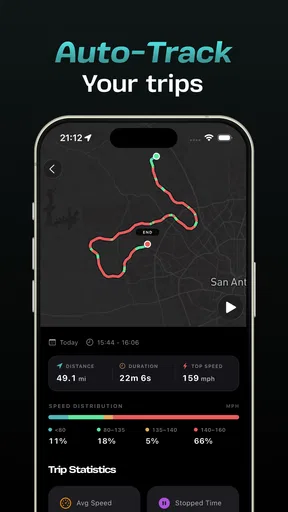
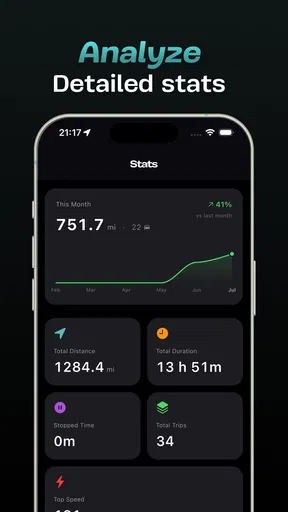
- Trip Logging: This is where it gets interesting. The app logs your trips, providing details like distance traveled, average speed, and even time taken. It's perfect for keeping a travel diary or just boasting about that epic road trip.
- Customizable Speed Alerts: If you’ve ever lost track of your speed, this feature is a lifesaver. Set your speed limit, and the app will alert you if you’re going too fast. It’s like having a digital co-pilot.
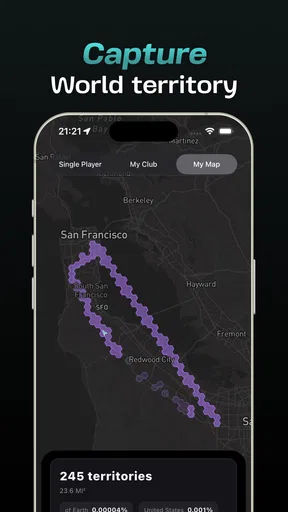
- Map Integration: With integrated maps, you can visualize your trip as you go. It’s handy for seeing exactly where you’ve been, especially if you're exploring new areas.
Performance on the Go
Now, onto performance. The app runs smoothly without any lag, which is crucial when you’re relying on it for real-time data. During my test runs, it consistently updated my speed without any noticeable delay. Plus, it didn’t drain my battery like some other apps tend to do—major brownie points there!
For an everyday test, I would choose a familiar route rather than a long, unfamiliar drive. That gives me a useful baseline: I can check whether the trip record captures the outing as expected, then decide whether the app earns a place in my routine. On a new route, the map view can help me recall where I went; on a repeated route, the logged distance and average speed are more likely to be the details I revisit.
If you are wondering whether it makes sense for short journeys, I think it depends on why you are tracking. A quick walk may be too brief to justify opening an app unless you are building a consistent record of similar walks. For a longer ride or drive, trip details are easier to put to use afterward. I would not track every single errand by default; choosing the outings that matter keeps the history more meaningful.
Everyday use without turning a trip into a project
Imagine heading out for a weekend bike ride on a route you know but have never measured. Before setting off, I would choose the speed units I am comfortable reading and decide whether an alert is appropriate. At the end, I could use the trip log to remember the distance, average pace, and time taken, rather than relying on a hazy recollection. On a later ride, the record gives me something concrete to compare, even if I am not training toward a formal target.
A driver could use the same basic routine for a scenic outing, while a walker might keep a few routes in the log to see which one fits into a lunch break. These are modest uses, but that is where the app’s idea feels most grounded: it helps turn a trip into a record without requiring a full navigation or workout setup. If you mainly need live directions, though, I would keep using a dedicated map app and treat TripRank as a separate companion.
One useful habit is to decide in advance what question the trip should answer. “How long did this familiar route take?” is easier to answer from a log than the vague goal of tracking everything. Another is to avoid comparing trips made under very different conditions as if the numbers tell the whole story; stops, route changes, and traffic can affect the result. The app can preserve the basic figures, but I still need to supply the context.
What the app does not replace
For a first-time user, a natural question is whether this can replace a car’s speed display. I would not use it that way. A phone tracker is best treated as an additional view of a trip, not as the primary instrument for driving decisions. Likewise, the map integration is useful for seeing a journey afterward, but it is not a reason to assume the app offers the route guidance or traffic features found in a dedicated navigation service.
It also occupies a different space from a fitness tracker. The logged pace and route can be interesting for a casual cyclist or walker, but someone who needs structured coaching, training plans, or a broader exercise history should look for an app designed around those goals. TripRank makes more sense when speed and trip summaries are the main interest, rather than one part of a detailed fitness program.
There is a further choice between convenience and depth. A phone app is easy to take along, but people who need specialized measurement for professional, competitive, or safety-critical use should choose equipment intended for that job. For everyday curiosity and personal trip records, the simpler approach may be enough. I would match the tool to the consequence of getting a reading wrong, not just to how convenient it feels.
Who’s It For?
If you’re someone who loves to keep track of your adventures, this app is a must-have. It’s great for drivers, cyclists, and runners alike. Even if you’re just someone who enjoys a leisurely walk, the trip logging feature can add a fun twist to your usual route.
It may be especially appealing if you like looking back at ordinary journeys and noticing patterns, rather than needing a coach to tell you what to do next. A casual cyclist can use it to keep personal ride records; a driver can review a trip’s broad outline; and a walker can compare a few routes. If your interest is simply finding the fastest way across town, or if you want detailed athletic analysis, I would pick a different kind of app.
TripRank is a free app in the Auto & Vehicles category from u-re, with an Everyone age rating. It has a 4.8 average from around 3,300 ratings and has been installed over 10,000 times. That gives a prospective user a sense of its place in the category, though ratings cannot tell you whether its approach fits your own habits. The app is currently at version 1.2.5, and in-app purchases range from $3.99 to $49.99 per item, so I would check the purchase details before paying for anything rather than assuming every option is included at no cost.
It was released on January 15, 2026, and requires Android 7.0 or later. Those details are useful if you are checking an older device or deciding whether to install it on a phone you keep for travel. The simplest way to judge the fit is to try a short, familiar outing and see whether you actually return to the log afterward. If you do, the tracker has a clear role; if you only wanted directions, it is probably not the tool you were looking for.
Final Thoughts
So, what’s the verdict on TripRank - Speed Tracker? Honestly, it’s a solid app with a lot to offer. It's not just about speed; it's about enhancing your travel experience and keeping track of your journeys in a meaningful way. The features are well thought out, and the user experience is smooth and enjoyable.
If you’re in the market for a reliable speed tracker that offers a little extra, I’d say give this app a go. It’s one of those tools that you didn’t know you needed until you try it. So, what are you waiting for? Hit that download button and get tracking!
My recommendation is to approach it as a lightweight trip journal with a live speed readout, not as an all-purpose travel solution. Start with one kind of outing, use a sensible alert setting if you want a reminder, and review the record afterward to see whether the information is genuinely useful to you. If that small loop fits your routine, the app has a practical reason to stay installed; if not, your navigation app or dedicated fitness tracker may already do the job you need better.
Pros
- User-friendly interface for easy navigation.
- Accurate speed tracking in real-time.
- Customizable alerts for speed limits.
- Detailed trip history with statistics.
- Minimal battery consumption during use.
Cons
- Limited offline functionality available.
- No integration with popular navigation apps.
- Ads can be intrusive at times.
- Requires location services always on.
- Premium features locked behind paywall.
FAQs for Enroad - Drive Tracker
What is TripRank - Speed Tracker used for?
TripRank - Speed Tracker is designed to help users monitor their speed, track travel routes, and analyze journey data in real-time. It's ideal for those who frequently travel by car, bike, or on foot, providing detailed statistics on speed averages, top speeds, and route efficiency.
Is TripRank - Speed Tracker available on both Android and iOS?
Yes, TripRank - Speed Tracker is available for download on both Android and iOS platforms. Users can find the app on the Google Play Store for Android devices and the Apple App Store for iOS devices, ensuring wide accessibility for all mobile users.
Does TripRank - Speed Tracker require an internet connection to function?
TripRank - Speed Tracker primarily uses GPS data to track speed and routes, meaning it does not require an active internet connection for basic functionalities. However, some features, like map updates or sharing data online, might need internet access.
Are there any in-app purchases or subscriptions in TripRank - Speed Tracker?
TripRank - Speed Tracker offers a free version with core functionalities. However, there are in-app purchases available that unlock premium features such as advanced analytics, ad-free experience, and additional customization options, providing an enhanced user experience.
How accurate is the speed and route data provided by TripRank - Speed Tracker?
The accuracy of the speed and route data in TripRank - Speed Tracker largely depends on the quality of your device's GPS signal. Generally, it provides accurate measurements under clear sky conditions, but accuracy might decrease in areas with poor GPS reception, like tunnels or dense urban environments.


